Is your to-do list really a don't-do list?

Mine sure used to be. I kept a running list on my phone, adding things as they came to mind. Five weeks in, I'd written down almost 100 tasks and finished maybe 70. The little stuff always got done. The big stuff, like my taxes, finishing that presentation, making that sales call, just kept getting skipped. Every morning I woke up to a never-ending list of giant things to do and no idea where to start. The fix wasn't a better list. It was a whole new system.

AN IDIOT IN MOTION GOES FURTHER THAN A GENIUS AT REST.

The biggest risk with planning systems is that you spend more time planning than doing. Not this one.

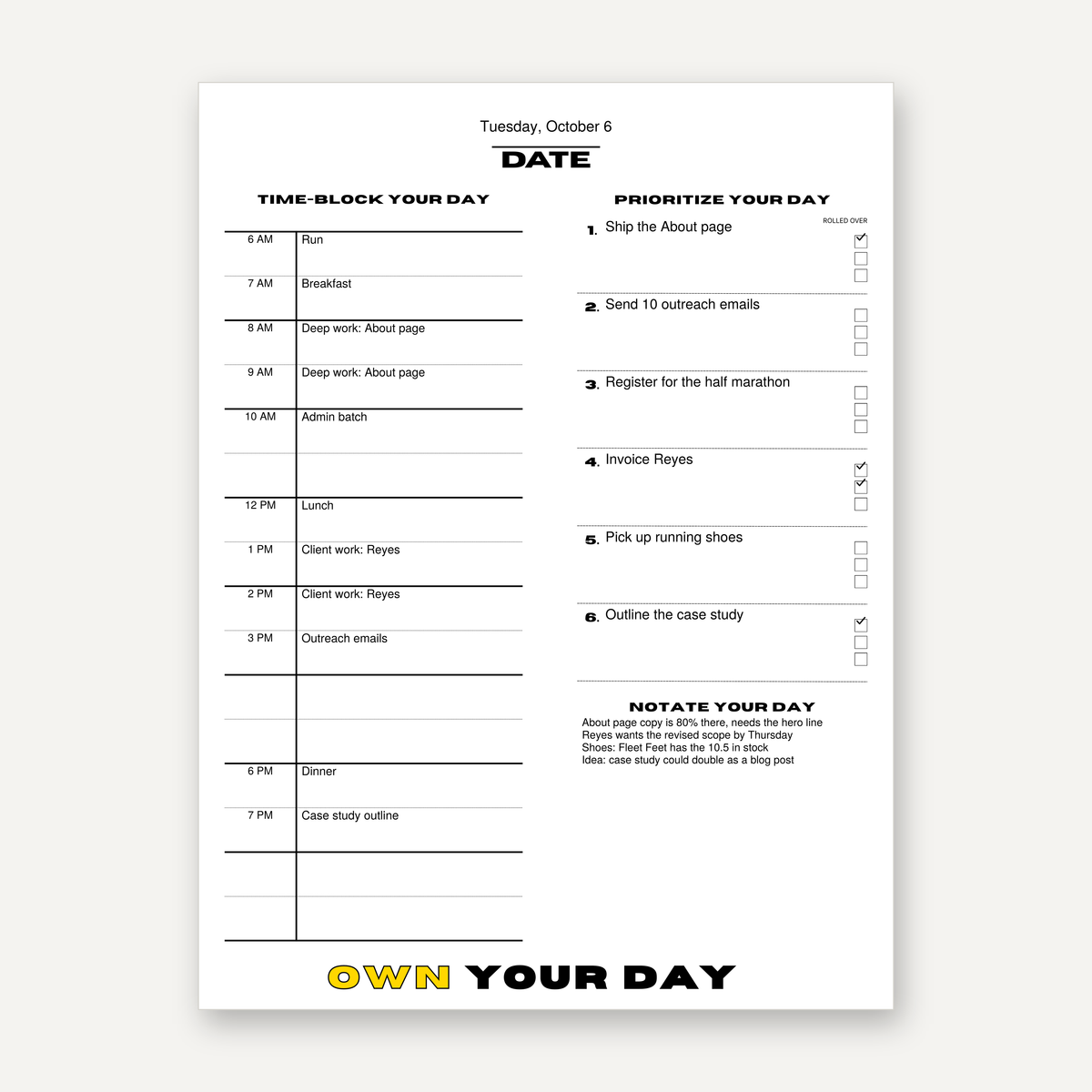
  • OWN YOUR DAY

    Write the six most important things for tomorrow, rank them, and work them in order. A 100-year-old method that still beats every modern productivity app.

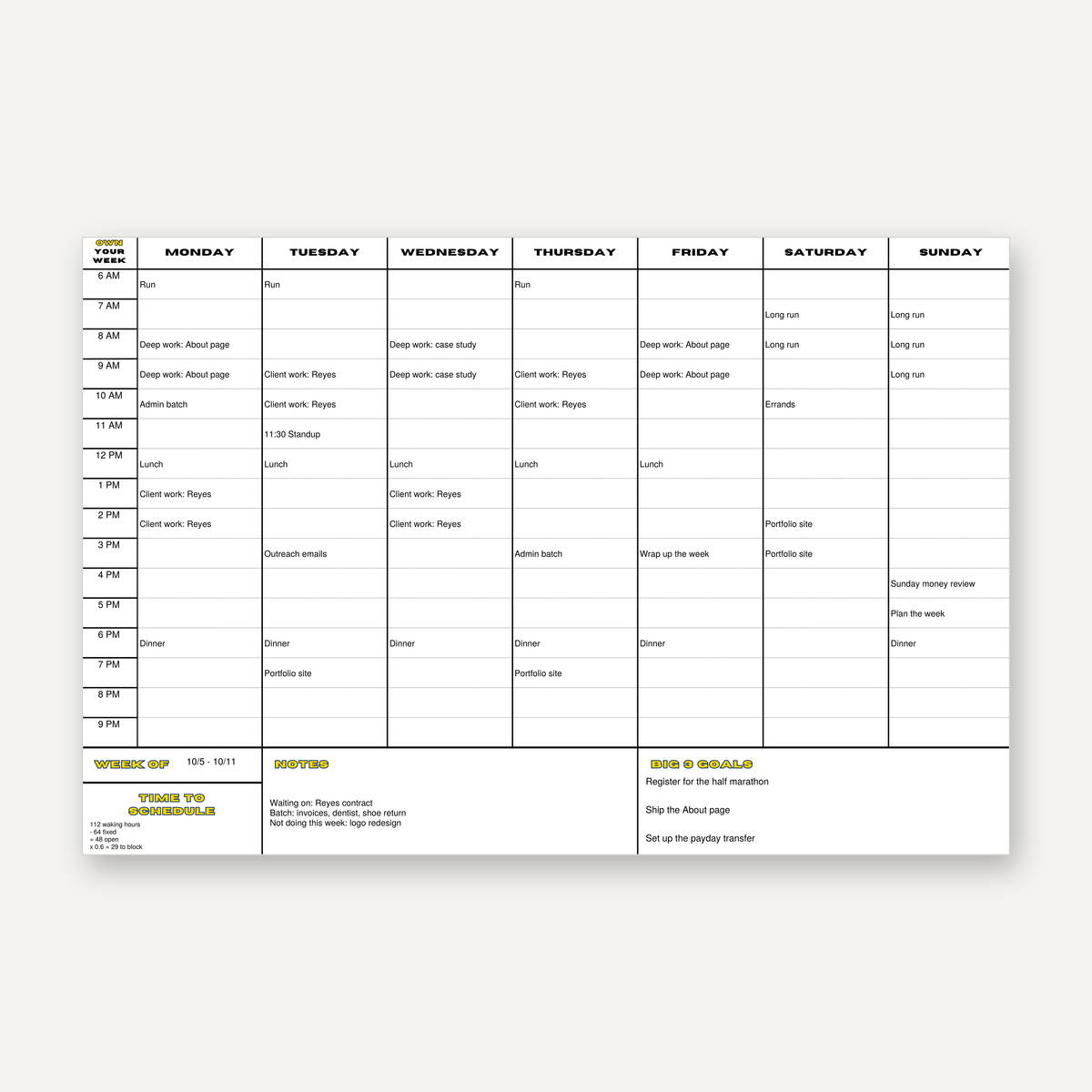
  • OWN YOUR WEEK

    Time Block your week before it starts, leaving space for the unexpected so you don't fall behind on your goals. Life happens, and this system lets it happen guilt free.

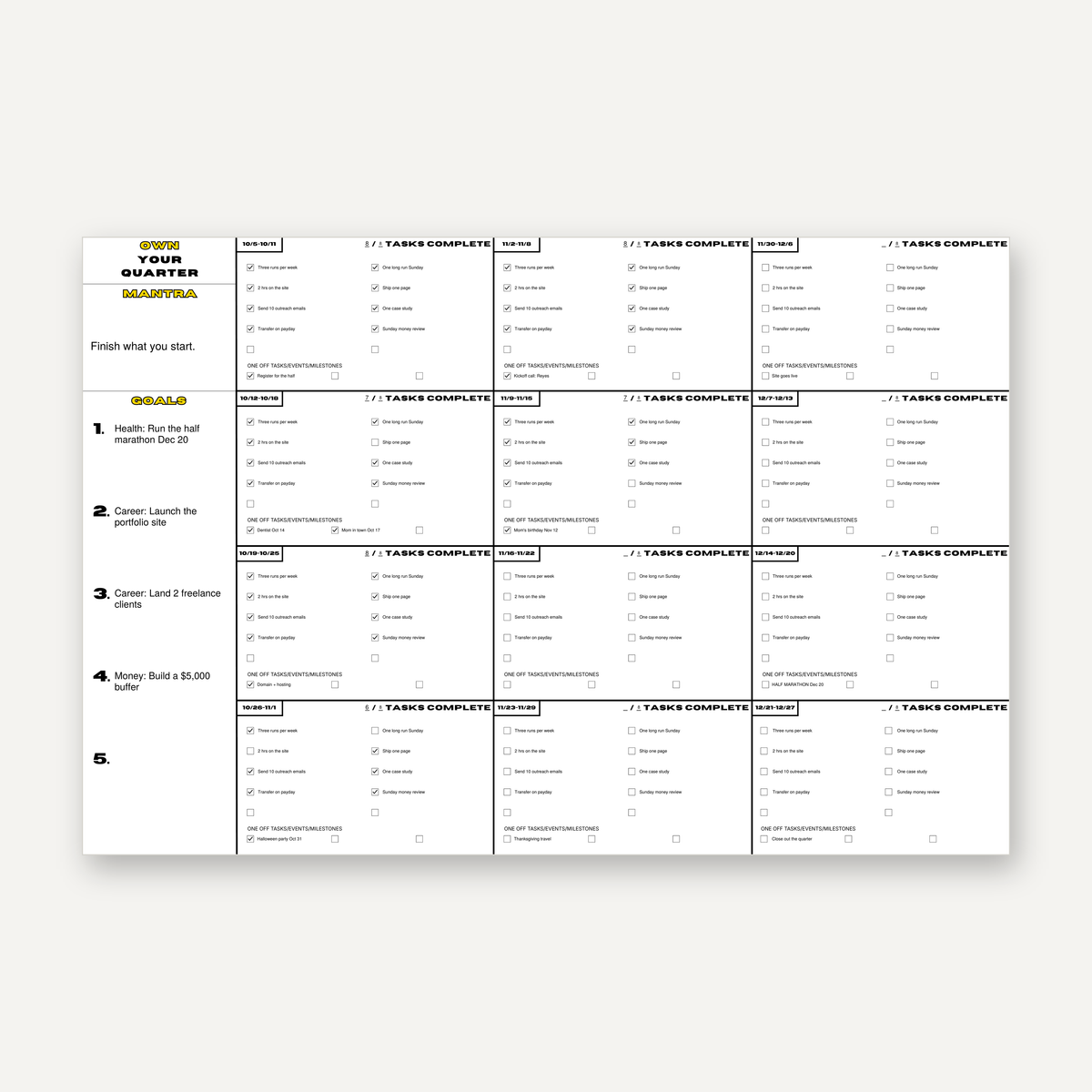
  • OWN YOUR QUARTER

    Twelve weeks, planned goals for multiple facets of life, and a weekly checklist system that keeps you on track. Do the daily work and the results will follow.

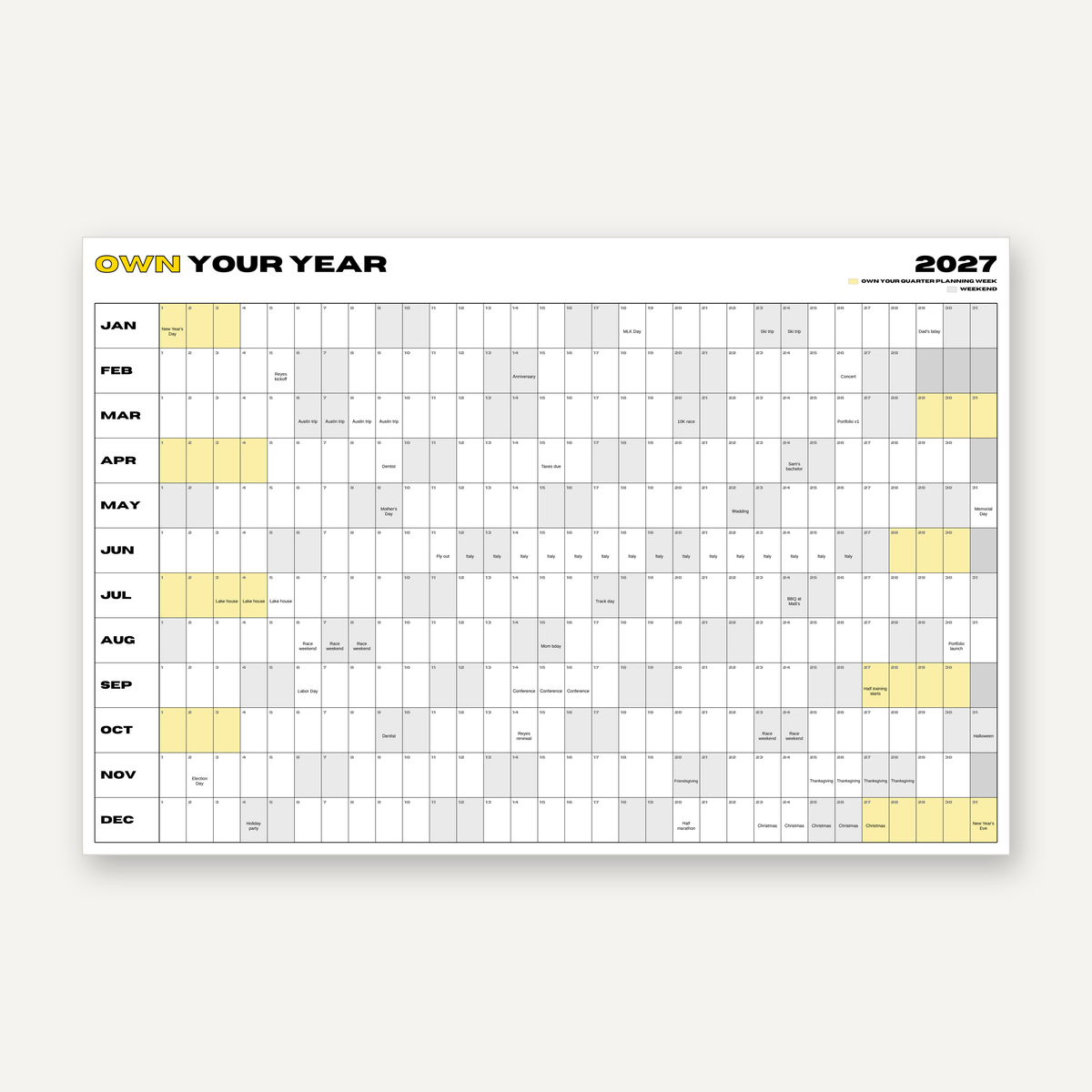
  • OWN YOUR YEAR

    Every big event, wedding, conference, and more for your year, all visualized on a single board that helps you make time to enjoy your life. After all, you OWN it.

  • Weeks 1-2

    Just the Day board. Five minutes at night writing down tomorrow's list of six. That's the whole job.

  • Weeks 3-6 

    Add the Week board. One hour on the weekend, and Monday morning stops being a guessing game.

  • Weeks 7-10

    Run your first 12-week Quarter. Joining mid-cycle? Start anyway and run a short one.

  • Week 11 and on

    Map out your Year. Lock in what can't move, then plan all the good stuff you want to do first.

EVERYTHING YOU GET

  • The Operating Manual (43 pages): every system step by step, what makes it stick, and the mistakes that make people quit so you don't.
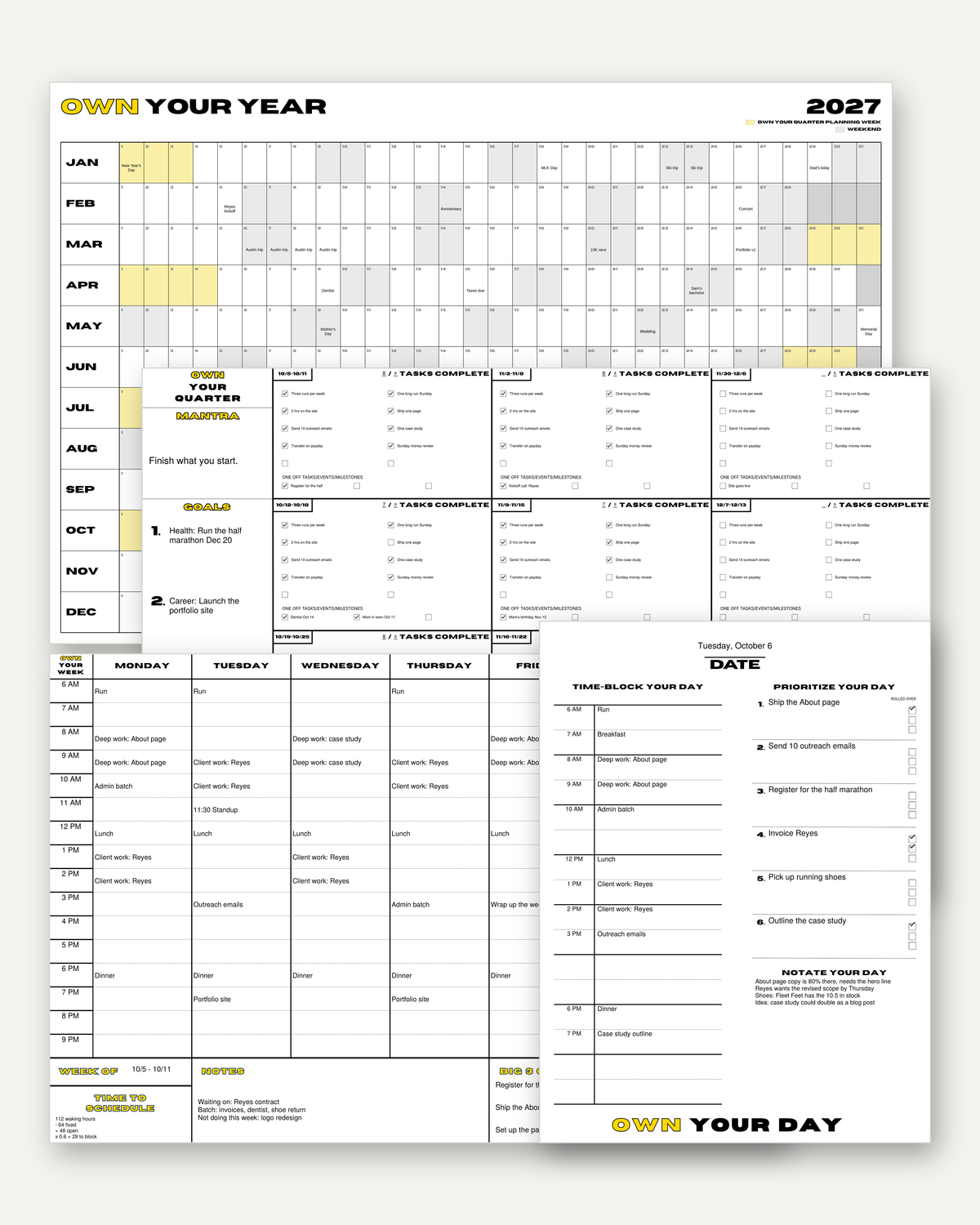
  • Four fillable boards for your Day, Week, Quarter, and Year. Leave them filled on your computer or print them and hang them up (we'll help with that).
  • Filled example boards, so you can see exactly what a real day, week, quarter, and year should look like.
  • The Week to Calendar tool, which lets you move your filled Week board to your Google or Apple Calendar.
Get the Boards

ONE GOAL. EVERY BOARD.

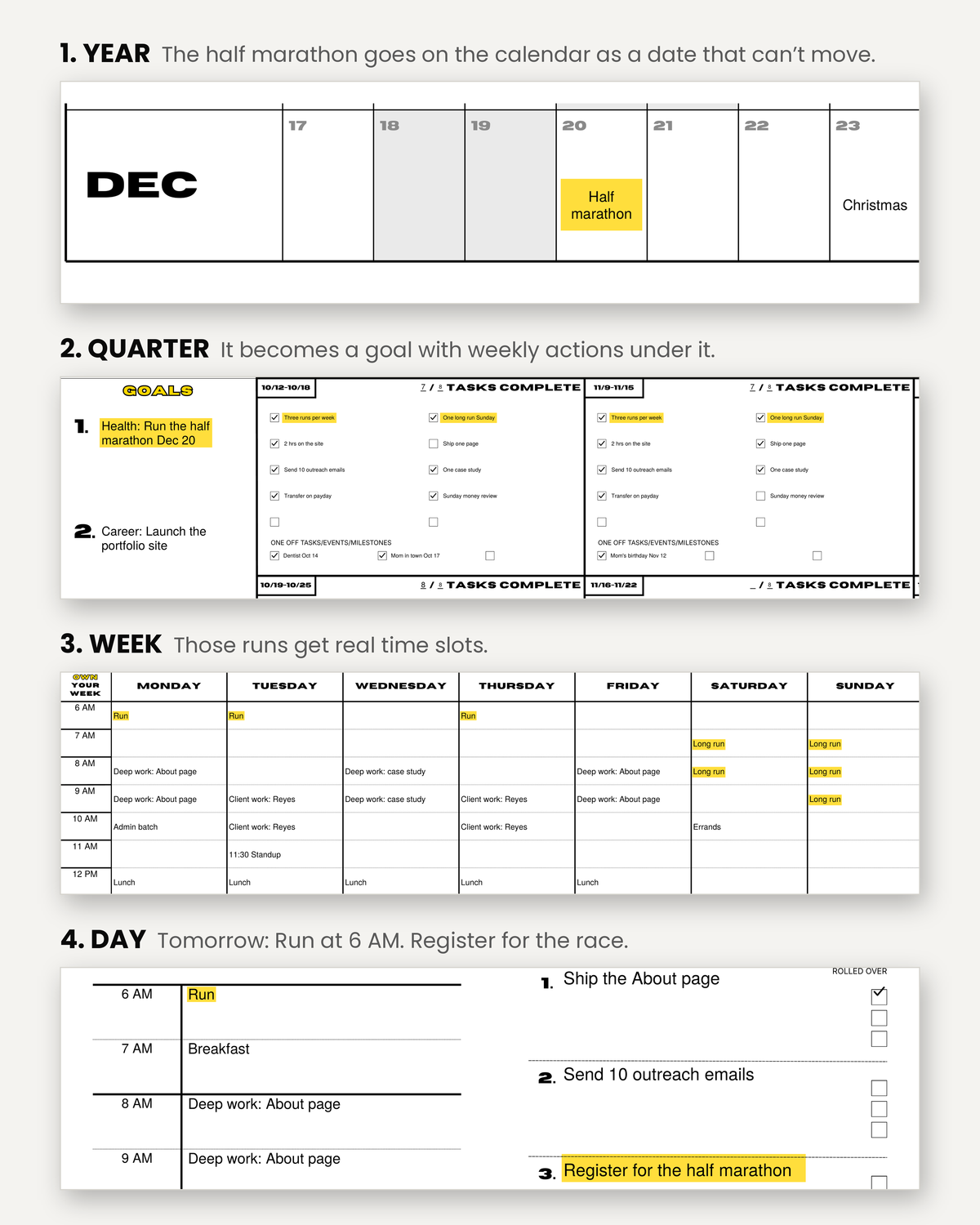
Here's how the system actually connects. Say you want to run a half marathon in December. It goes on your Year board as a date that can't move. Your Quarter board turns it into a goal with weekly actions, like three runs a week. Your Week board gives those runs real time slots. And your Day board puts "Run" at 6 AM tomorrow.

Big goal at the top. One small thing to do today at the bottom. That's the whole system.

I'M NOT A PRODUCTIVITY GURU.

I'm Eli, and if you're like me, you've got a lot going on. I run my own businesses, I have way too many hobbies, I'm engaged, and I'm a competitive racecar driver. With all that, I used to be the guy with 100 things on a to-do list and no idea where to start.

Eventually I got fed up and went looking for a change. I read the books, tried the methods, and kept only what actually worked, so you don't have to go through the same growing pains I did. Ten years of tried and failed systems led me here. This is what helps me OWN My Life, and it can do the same for you.

Read The Full Story

THE BOOKS BEHIND THE BOARDS.

Every board is built on ideas that have worked for centuries, dating back to Benjamin Franklin's daily block schedule from the 1700s and Ivy Lee's six-item list from 1918. From there: Getting Things Done by David Allen, Deep Work by Cal Newport, The ONE Thing by Gary Keller and Jay Papasan, The 12 Week Year by Brian Moran and Michael Lennington, Atomic Habits by James Clear, and Jesse Itzler's year-at-a-glance calendar. I'd recommend you read every one of them.

The OWN Your Life system is a combination of principles, systems, and guidance from all of these great books and authors, with tweaks to make them all work cohesively.

BEFORE YOU BUY

What exactly do I get?

An instant download with the 43-page Operating Manual, four fillable PDF boards (Day, Week, Quarter, and Year), real filled-out examples of each, and the OWN Your Week to Google/Apple Calendar tool

Do I need any special software?

Yes, the free Adobe Acrobat Reader. It's what makes the boards fillable, and it works on Mac, Windows, iPhone, and Android. Browsers and apps like Preview don't handle the fields reliably, so use Acrobat to fill them. If you're only printing, any PDF viewer works.

Can I use it on my phone?

Yes, through the Acrobat Reader app. That said, the boards are big, so you'll have a better time filling them on a computer or tablet, or printing them out.

Can I print the boards?

Yes, and I’d recommend it. The boards print at standard poster sizes (18x24 for the Day board, 24x36 for the rest), so any office store or online poster printer can handle them, usually for around $15 to $60 each. Laminate them or pop them in a poster frame and they work with dry-erase markers, so you can reuse them for years. The manual includes a full step-by-step printing guide.

Is this a subscription?

No. You pay once and it's yours forever.

Do I have to use all four boards?

No, and please don't start with all four. Begin with the Day board for two weeks, then add the rest one at a time. The manual lays out exactly when and how to add new systems to your life.

What happens when the year ends?

You get a free new Year board sent to your email, every year. No extra costs or subscriptions. 

I've tried planners before and always quit. Why is this different?

Because most planners expect you to be perfect from day one. This system is built for real life: you add one board at a time, there are no streaks to break, and the Quarter board aims for 85 percent, not 100. Miss a day and you just pick back up tomorrow.

How does the calendar tool work?

Fill out your Week board, upload the file to the free tool, and it turns your time blocks into calendar events you can add to Google or Apple Calendar in a single file transfer. We'll guide you through it.

What's your refund policy?

Try it for 30 days. If it's not for you, email me and I'll refund every penny. No forms, no questions, and you keep the files.

What if I get stuck?

Email me. I read and answer every message myself, and I am happy to help you.